





Skip to content

Agile software development using DevOps workflows

from Florian Haßler

Developing and publishing software can be a time-consuming process. Manual testing, integration and publishing steps take a lot of time and are prone to errors. In the past, showstoppers have therefore often appeared very late in the course of a project, forcing everyone involved to take a few steps backwards. A CI/CD DevOps workflow is one way of dealing with this problem.

Contents

  • Workflow
  • Experience with pipelines
  • CI – how: Continuous Integration
  • CD – how: Continuous Delivery
  • CD – how: Continuous Deployment
  • CI – how: Continuous Improvement
  • Advantages
  • Author
Artificial Intelligence

Workflow

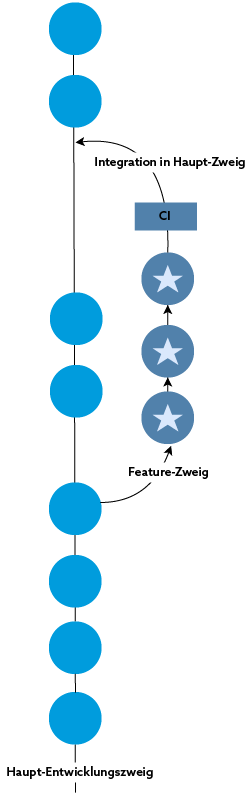
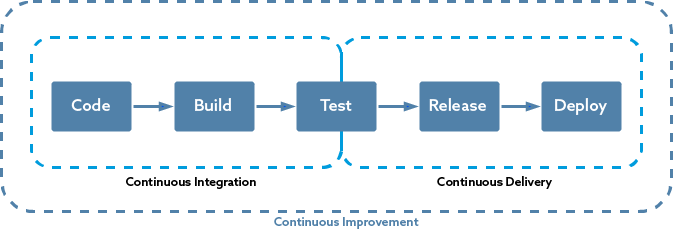
The workflow roughly explained: The developers select a ticket that has been recorded and specified by the customer. They start writing tests and then cast the feature into code (see article on test-driven development). All of this takes place away from the active code base of the application in a separate code area. Before the feature is integrated into the active code base after all acceptance criteria have been met, it is automatically put through its paces. Only once it has been tested is it published to the test system and subsequently to the production system. Why automated? Tests can be defined once in the automation pipelines and the associated requirements can therefore always be ensured without human intervention. Containerization also helps to make the tests reproducible. Publishing is also automated. A few minutes after implementation, a new feature is already visible on our customers’ test system and is available for user tests. Due to automated tests, programming errors only very rarely make it through to the test system. This means that customers do not have to deal with these errors and can concentrate on the content of the features. This article goes on to describe what the abbreviations CI and CD stand for for the developers at RISC Software GmbH. The four strategies presented here greatly simplify the day-to-day work of developers and users.

Experience with pipelines

There are several platforms for implementing such automation pipelines. At RISC Software GmbH, we have experience with Concourse, Jenkins and GitLab. The web development teams in particular have shown that they are best able to integrate GitLab into their workflows.

Workflow

CI – how: Continuous Integration

One idea of continuous integration is to automatically integrate new features as quickly and as often as possible. This involves short feedback loops. They help developers to identify and resolve problems before the context is changed (i.e. the next task is started). The key question is: Can the developed feature be integrated into the existing application without having a negative impact on existing functions?

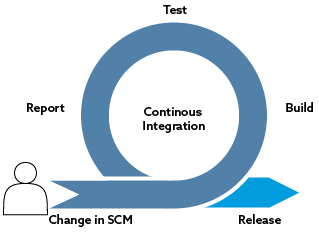
Put simply, developers enter their changes into our source code management system (SCM) and the CI pipeline starts to work. When it is finished, it notifies the developers of success or failure.

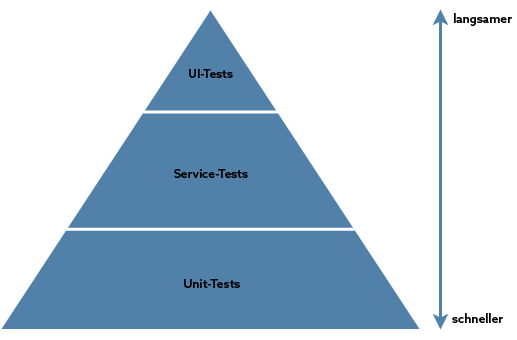
Depending on the type of project, different tools are used in the integration pipeline. It is almost always started by running the test suites according to their position in the test pyramid (according to Mike Cohn). Unit tests form the basis of the test pyramid. The smallest possible behavioral units are tested. They ensure that the code works as expected. Integration tests are then used to ensure that the interaction between the various parts of the application or with external components (e.g. databases) also works. If a test fails, the test pipeline is aborted and the dev team receives a notification.

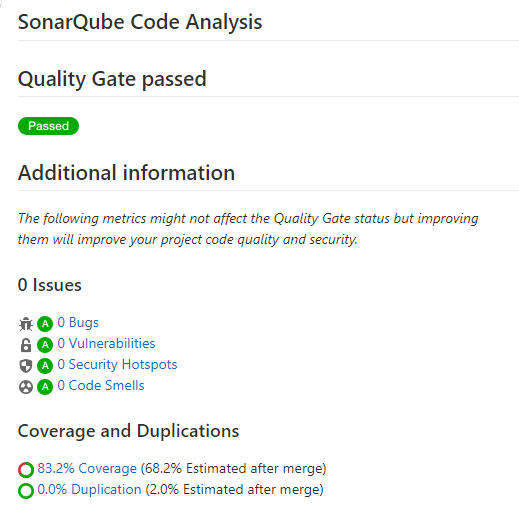
The last step in the RISC-Software-GmbH CI pipelines is almost always a static code analysis using an appropriate tool. This helps to identify vulnerabilities and inconsistencies with common development practices. The tool used in the RISC software contains many built-in rules for different programming languages. The result of the analysis is an assessment of the technical quality of the source code. As can be seen in the figure, the number of errors, vulnerabilities, test coverage, number of lines of code written and much more are also output. The developers receive an automated evaluation of their code.

CI
Pyramid
Analysis

CD – how: Continuous Delivery

Once the CI pipeline has been successfully completed and the report from the code analysis tool is satisfactory, the continuous delivery pipeline is activated manually. It pursues the goal of executing the release process automatically, quickly and reliably. The artifacts built in the CI pipeline are collected and published on the test system. This publishing step can be simple and simply copy source code to a server or more complex. The target system and the location of the target system are decisive for the complexity.

One advantage that is often mentioned in connection with continuous delivery is that the application can be released at any time. There is never a time when there is code in the active code base of the version management system that is not functional. If customers report a problem, the team can respond promptly and publish a new version. Another advantage is, of course, that classic releases are no longer necessary, but that feature by feature can be tested and approved directly by customers.

CD

CD – how: Continuous Deployment

Continuous Deployment takes the steps of Continuous Integration and Continuous Delivery one step further. Here, all changes that successfully pass through the CI pipeline are also released immediately. This process is fully automated and only a failed integration step prevents the changes from being transferred to the test system and subsequently to the production system. This works if there is a high level of trust in the developers, the continuous integration process and the continuous delivery process. Continuous deployment mainly has its place in the large-scale product development business; in the classic project business, the necessary prerequisites are often not economically viable.

Research

CI – how: Continuous Improvement

The image below shows the notification that some dev teams received the morning after the security vulnerability in the Java logging library Log4j became known. The security checks of the libraries used run automatically every night in order to provide the applications we develop with patches as soon as security vulnerabilities become known. They also help to regularly update the software libraries used in applications developed by RISC-Software Gmbh and thus keep them up-to-date. Improvements are implemented incrementally, evaluated and then further improved. The result is leaner workflows and therefore more time for the implementation of new features.

CI

Through continuous integration, delivery, deployment and improvement, RISC Software GmbH has gained the ability to publish frequent releases without compromising on quality.

The advantages of our DevOps workflow for customers:

  • Minimized risk of errors (and errors can be corrected more quickly)
  • Shorter response times (customer feedback can be incorporated more quickly)
  • Lower costs for manual tests (more features for the same amount of money)
  • Progress in the development process is visible
  • Security gaps are quickly identified and eliminated
  • Components, frameworks and libraries are updated more efficiently

Info

Artefakte

Artefakte sind die Dateien, die durch den Buildprozess erstellt wurden, z.B. Docker-Images, ZIP-Files, Protokolle.

Akzeptanzkriterien

Akzeptanzkriterien beschreiben, unter welchen Bedingungen eine vom Entwicklungsteam umgesetzte Anforderung als fertig entwickelt gelten soll.

Feature

Ein Feature ist eine bestimmte Funktion in einer Applikation (z.B: Benutzerverwaltung, Login,..)

Pipeline

Eine Pipeline in der Softwareentwicklung steht für die Summe alle Aktivitäten, die von der Idee bis hin zum Betrieb dieser Idee führen.

Source-Code-Management-System

Source-Code-Management-System (SCM) ist ein System, das zur Erfassung von Änderungen am Programmcode dient. Die aktuell verwendete Version wird im Hauptzweig abgebildet. Entwickelnde haben die Möglichkeit, Zweige (wie bei einem Baum) für Features zu erstellen.

Testsystem

Ein Testsystem ist eine Version nur für die Auftraggeber*innen.

Ticket

Aufgaben unserer Entwickelnden werden in einem Ticket-System abgebildet, ähnlich wie Kund*innenanfragen bei größeren Konzernen.

Workflow

Ein Workflow ist ein Arbeitsablauf, der die zeitliche Reihenfolge von zusammengehörenden Arbeitsvorgängen bezeichnet.

Contact us


    Author

    Florian Haßler

    Software Engineer